May 21, 2019
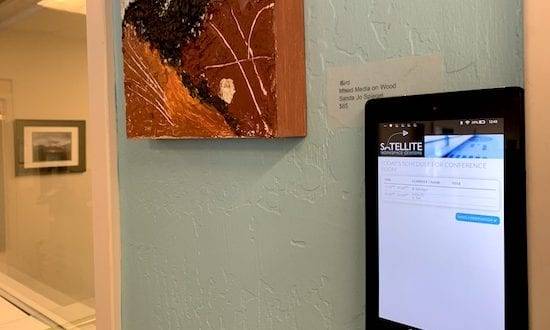
Meeting rooms are a huge draw for coworking space operators and members.Whether for team meetings, video calls, media projects, brainstorm sessions or recurring work sessions, meeting rooms provide great workspace value.Unless you have a streamlined, automated system linked to your coworking software, however, meeting room use can be tricky.For instance, do you ever have members squat in a meeting room without reserving it? Do you have problems with people walking in on each other’s meetings or calls? Do you have members setting up in a room that looks empty, only to discover that another member has it booked in 10 minutes?
The new Deskworks Reservation Tablet App makes these meeting room collisions and challenges completely avoidable.Our meeting room tablet app sits outside the door and displays the reservations for the current day. Members can see what time the room is available and make a reservation directly from the tablet.Event titles are also displayed, which is helpful for public events.
The app works on any IoS or Android tablet. Just download the Deskworks app from the AppStore or Google Play. Select the room you want to display and click “Start.”Mount the tablet to match your workspace design and aesthetic with a store-bought or custom bracket.Note: Tablets require power, so be sure to wire it in or have a power source nearby to recharge the battery.
Get in touch with any questions. We’re happy to walk you through setting up the meeting room app in your workspace.Once you have the meeting room tablet and app set up, send us a picture of your mounting configuration and your tablet in action. We’ll share it on social media.Contact the Deskworks team to learn more about our meeting room app and how we can help you run your coworking space more efficiently.
May 21, 2019
See how Deskworks helps coworking operators grow revenue while staying people-first.
Book a Demo

Deskworks is simple, powerful coworking management software built to automate your operations, capture every dollar of revenue, and give you more time to focus on your community.