Business Tips
Barbara Sprenger
November 19, 2026

Written by Barbara Sprenger, Founder and CEO of Satellite Workplaces and Founder and CPO of Deskworks, with more than 15 years of experience opening and operating coworking spaces.
Training a new coworking community manager (CM) takes about two weeks initially: a structured first week that moves from your vision and daily tasks into operations software, IT, mail, aggregators and events, testing each piece as you go, then a second week of review and testing. Additional review and training will certainly be needed, based on retention and questions that arise in the real world.
The training starts before you hire, with a job ad that sells the range of the role and a Community Manager Manual that doubles as your training guide.
At first blush, a coworking community manager job seems like an impossible position. How does one person have the skill set (and mindset!) to be an empathetic salesperson, a detail-oriented admin, a genial host, a statesmanlike mediator, a mini-IT guy, and an up-to-date software user across operation platforms, writing tools, and design tools?
When we opened our first coworking space in 2009, we thought this would be the fatal flaw in the business. It has proved the opposite! Over the years, we have had wonderful CMs, two of them staying with us long enough to retire from the position with our company.
If you are running smaller centers, you are probably running with just one CM who is responsible for everything; if you have bigger centers or multiple centers, you may be able to have people specialize a little more. Since it's a more difficult job when you do it all, let's talk about how to train CMs who have to do it all.

In the industry, community managers typically stay a couple of years. This doesn't have to be true. People will stay longer if you recognize a few important overarching concepts.
Now to the nuts and bolts of training…

When you post an ad for a new hire, be sure you mention the community you're building, the range of skills they will be learning, and the exciting and innovative businesses they will be connecting with. You are offering an interesting job - be excited about it! Let them know that you're looking for someone with a broad range of skills. They will not be bored in this job; each day is different.
Here's one of our typical job postings:
[Coworking Company] is looking for a bright, energetic Community Manager to run our [Location] flex workspace center. Coworking spaces have become popular worldwide, offering start-ups affordable and scalable workspace plus the camaraderie of being with other entrepreneurs and knowledge workers. We are a fast growth coworking space company with [X] offices in [State]. We provide high quality workspace to professionals needing private offices, virtual office plans, meetings, conference rooms and event space.
The successful candidate for the Community Manager position will need excellent communication and administrative skills and enjoy building and managing an entrepreneurial community. We need someone with solid sales aptitude who would be able to present available offices and other work spaces, communicate the benefits of working in a shared-work environment and influence the decision-making of potential members. Must be computer and social media savvy, comfortable with Google office products and standard office equipment, and a quick study on new software. Experience with multiple computer platforms is a plus.
If you are an outgoing person that enjoys helping other people, are detail-oriented, have a solid sales aptitude and strong multi-tasking skills, this may be an excellent fit for you.
We offer competitive hourly rates plus bonuses.
Post the ad where coworking people look for work. Coworkies lists coworking jobs worldwide, and LinkedIn, Indeed and the careers page on your own website widen the pool.

Before you post the ad to hire, have your Community Manager Manual in place. Have it in a binder on the CM desk and have it online in your drive where you have cleanly organized everything your CMs need.
The first thing in the manual needs to be your Vision Statement and Mission Statement. Don't leave these out! You will not be onsite every day, and it's vital that the vision of your centers, the "why" of your existence, carries through every action that your CM takes. You want to be sure they are excited to come to work each day, and that they feel part of a larger vision that improves their community. Make it beautiful and post it near your front door!
Your manual needs to be well organized and tabbed, so your CM can quickly find what they are looking for. This is also your guide for training. Here are the chapters that we cover:

Your first day will be taken up with an Orientation Overview. Start with a personal checkin and move into discussing the Vision and Mission of your organization. You'll need to do all of the new employee onboarding at this stage as well.
Go through the morning opening tasks together. Use the manual, so they have a checklist to start with. This will quickly become second nature. Be sure they have a good handle on their daily, weekly and monthly tasks.
Walk the center, pointing out all of the features, how you expect the space to be tidied and set up each day. Explain that people will move chairs and perhaps desks around, but at the start of each day the space should be in a particular configuration. Point out your electronic components (cameras, access points, noise cancellation, smart TVs, printer, etc.) This will be overwhelming, so don't go into detail at this point.
In your interview process, you should have identified the new CM's strengths and weaknesses. We have each interviewee do a tour for us, write a letter demonstrating their tact in a difficult situation and set up a spreadsheet based on a particular question. Are they strong in sales skills? If not, emphasize in your teaching the importance of listening, asking questions, building rapport - and asking for the sale! Are you a bit unsure of how well they will manage the detail of running a center? Emphasize the need for organization, how it will save time in the long run and make their life easier. If you're not satisfied with their personal methods of organization, give them the ones you want them to use.
You'll want to quickly get to New Member Signup and Onboarding. While you're training, the center has to give the vibe to potential new members of a well-ordered and smooth-running comfortable place to work.

Be sure their computer is ready for them when they arrive, along with logins and passwords for the software they will be using. You probably have operations software that you use for running the center. Introduce this on the first day, but you will be returning to it each day as your training gets deeper. Be sure they have an overview understanding of the logic of the software and how it interacts with your operation. Since it is probably the beating heart of running your center, test on each piece that you are teaching!
Whatever password keeper you use, this can be the biggest first day frustration. Know how they will access every online service and software they will be using. There are a lot! Think about each aggregator's site - you are unlikely to have less than ten, counting reservation and mail services… then your graphics program for creating signs and posters…perhaps an email program, door access, printer, CRM, payroll, benefits portal…
You likely do not have much on paper any more, and your file storage has probably moved to the cloud. Be sure the new CM is comfortable with the logic of where to find every document, equipment manual, and piece of marketing collateral that they will need. If you introduce this on the first day, know that you will need to return to it as your new CM becomes more familiar with the operation.
Your community manager won't be an IT guru, but they do need to have an understanding of your infrastructure. Be sure they can identify the modem, router, switches, UPS and access points and have a basic understanding of what they're for. We set up our centers with a lighted, labelled power switch on the server rack, so that an IT person can direct the Community Manager to switch things on and off remotely, if needed.
If you have a noise cancellation system, cameras, smart TVs and phones, introduce these in the first few days. The manuals should be in your online file storage system, clearly titled in a Manuals folder.
Managing your HVAC system and thermostat control fall under this category - it's always the biggest point of contention, so don't skip it!
For the network itself, our guide to the best router for a coworking space covers what to install and why.

Events are part of a community manager's job from the first week, so the expectations and the materials need to be ready before they start.
Do you expect your CM to host a certain number of events or mini-events each month? Are they doing things like regular Waffle Wednesdays or Stone Soup Lunches? Your manual should have an example of all of the collateral for a typical event, with an overview of how to think about each event.
New staff need to have a guide for when members or non-members hold events in your facility. Be sure you review this in the first week and elicit as many questions as you can, so you know your new CM is thinking about fostering more events.
Conflict resolution is the soft skill coworking training guides put near the top of a community manager's list. Art of Co names conflict resolution and non-violent communication among the core skills to train, and in our experience the goal is to resolve disagreements between members quickly and fairly.
Walk your new CM through the complaints your centers actually get (starting with the thermostat). Agree on what they can settle on the spot, what needs a written follow-up, and when they should call you. A CM who knows where their authority ends can stay calm and friendly in the moment, because they are not making up policy under pressure.
Review your company style sheet and the voice you want used for any signs or posters. We don't allow anyone to post signs in the "Your Mother Doesn't Work Here…" voice! You have the image you want to present, and everything that everyone in your organization does should foster and support that image.

The first week of community manager training covers a new area each day and tests earlier material as it goes, so nothing is taught only once.
Day One
Day Two
Day Three
Day Four
Day Five
Second Week - review and test as needed
Your training of a new CM will never go as smoothly as you would like - and that's fine! If you're running a busy center, all of the standard daily surprises will occur. Your new CM will learn from these. Since we use Deskworks to run our centers, much of the back office work is handled automatically, as is tracking of member usage of the space. Members are quite self-sufficient in the software, so the CM is generally handling the surprises and one-off situations.
The important things to remember are to…
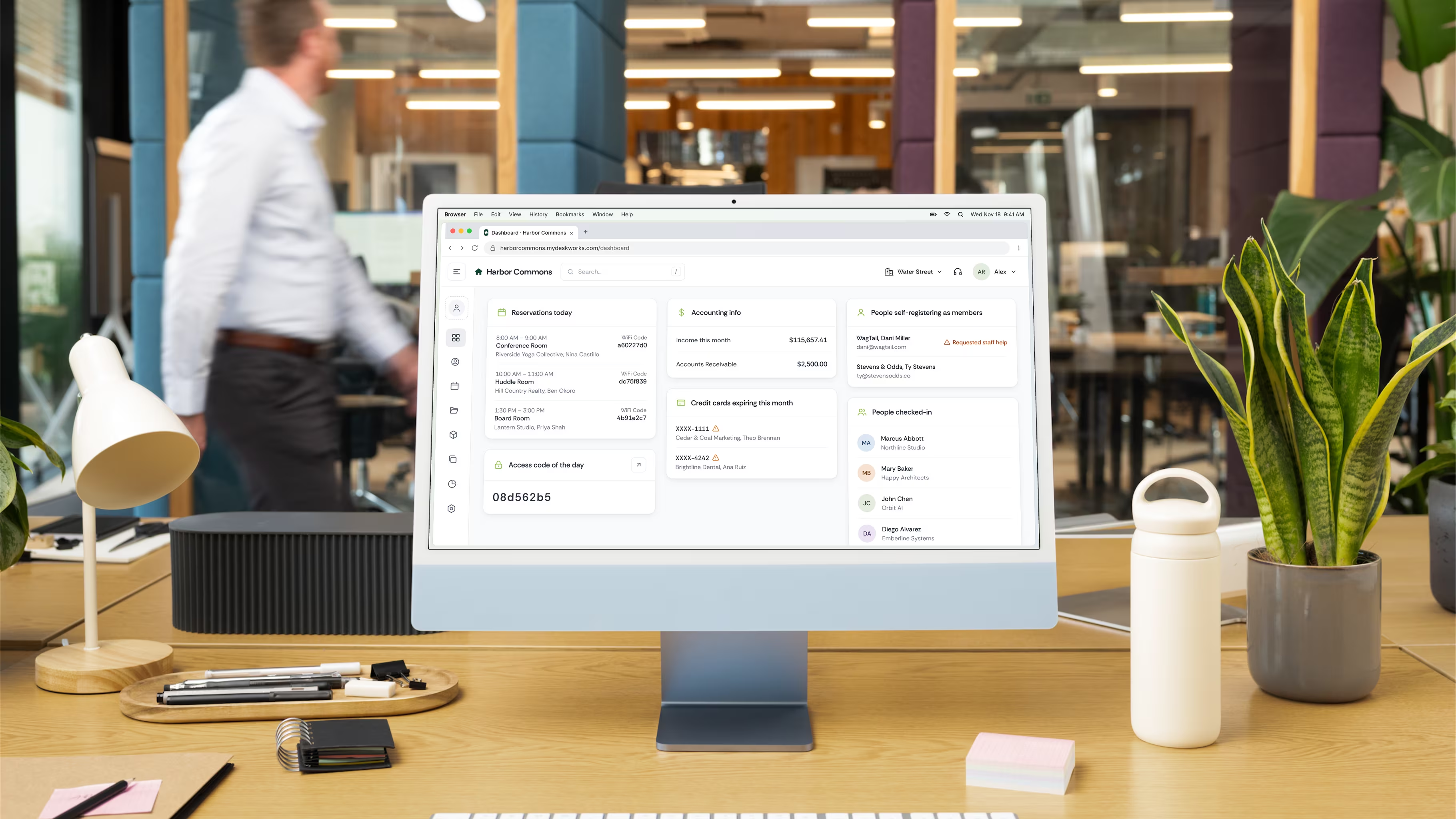
The Deskworks chapter of the manual is the one a new community manager uses every day, because billing, reservations, communications and reports all run through it.
Week one goes faster when much of that work runs on its own. Auto Invoicing runs recurring plans, discounts and usage charges once they are set up, so a new CM learns to check billing rather than build it each month. The Self Service Portal lets members sign up, make reservations, update payment methods, review invoices and track credits on their own, which keeps routine questions away from the front desk while the CM is still learning. And if you use the Deskworks Proposal Generator, whatever someone signs is set up automatically as monthly recurring billing.
Intelligent Network Check-In checks members in when they connect to WiFi, and the One View Dashboard shows who is in the space with photos and names, so a new CM can greet people personally from the first day. For the owner, the KPI Dashboard tracks sales totals, occupancy changes and space usage over time, which is part of the remote visibility the last checklist above calls for.
Coworking community manager training takes about two weeks: one structured week that introduces a new area each day, and a second week to review and test, followed by reinforcing over the next several weeks. By day two, the new CM should be doing the morning opening tasks on their own.
Sales and organization come first: presenting offices, influencing decisions and asking for the sale, then keeping the detail of a center in order. Around those, a coworking community manager needs hospitality, the patience of a mediator, comfort with operations software and design tools, and enough IT knowledge to identify the router, switches and access points. Hire for sales and organization, and let community manager training cover the rest.
In the United States, coworking community managers earn an average of about $59,000 a year, according to ZipRecruiter. Most fall between $47,000 and $67,000, and top earners make around $80,000. In our experience, new community managers often start closer to $40,000, while experienced ones in big markets like New York or San Francisco and those covering large centers tend to sit at the top of the range.
Many operators pay hourly plus bonuses; at our centers, CMs also share 5% of their center's monthly profit. Be sure you are meeting labor laws; in California a community manager is generally treated as non-exempt, so you are safest to track hours and pay them as an hourly employee.
Only the basics. A community manager should recognize the equipment and follow an IT person's directions remotely, while repairs and network outages go to a technician. Art of Co makes the same case: advanced fixes "can be outsourced to specific technicians," which keeps the CM focused on members.
Business Tips
Barbara Sprenger
November 19, 2026
See how Deskworks helps coworking operators grow revenue while staying people-first.
Book a Demo

Deskworks is simple, powerful coworking management software built to automate your operations, capture every dollar of revenue, and give you more time to focus on your community.